
🏗️ How this blog was set up
Aren’t we here to talk about technology?
My needs
I’m looking for a solution with no maintenance that helps me to focus on writing content and not maintaining the full system. So don’t expect a microservice architectured CMS on AWS Lambda though we might use it for some projects later :)
I also want a system with multilingual support to write in Globish 🇬🇧🇺🇸 and French 🇫🇷.
This fits completely the architecture pattern called Jamstack (Javascript, API, Markup stack) that sits on top of pre-rendering and decoupling.
Hugo: a static website generator

Logo of the Hugo project
This blog is generated by Hugo which is a nice static website generator like Jekyll or Gatsby.
It takes simple Markdown (md) files as input and generates your website structure with nice, optimized and fast html files. (don’t blame hugo on the accessibility, it’s something I need to work on)
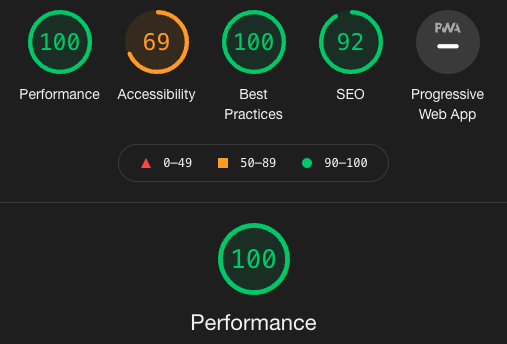
Look at these amazing performances!
By static, it means that no machine or VM is required to run it. You just need to host the files on a “dumb” http drive. This implies low resources to host and low resources on local machine.
🎨 Theme
I’m using the m10c theme slightly customized that I found simple and elegant. I’ve only tweaked the colors, changed the avatar and modified the list template to add the description.
Sass is needed to modify the scss files. You can do it easily on a Mac if you already have npm installed.
npm -g sass
The few ticks I’ve set in place are:
🇫🇷🇺🇸 Multilingual support
In order to setup the multilingual support, you need to configure the menu, duplicate the content and add some link to help the user to switch from a language to another.
Unfortunatly, when using multilingual support, the customized 404 page is not working really well with GitHub Pages.
GitHub Pages only supports a unique 404 page named 404.html at the root of the repo.
The only way then is to copy the 404 of the language you’ve chosen and move it at the root folder.
Fortunately this can be automated in the GitHub Actions as we will see in the following section.
🏗️ Deployment chain

deployment chain diagram
I’ve chosen Github Page as my hosting solution. It is as simple as copy and past the content of the code generated by hugo (usually the public folder) and paste it in your <nickname>.github.io repo.
To automate the process you can use a repo for the source of your blog content and use Github Actions to automate the deployment.
You can follow this tutorial to integrate Hugo in GitHub.
To fix the 404 page issues discussed above, I’ve just added a step in the .github/workflows/gh-pages.yml to copy the English 404.html at the root as seen below.
| |
Google Analytics support 1
To follow my tiny audience, I’ve setup Google Analytices as this is the tool I know and that I can set up for free.
This is really straight forward to configure as you just have to add googleAnalytics = 'G-YOURGAID' to your config.toml file.
Asciinema: Terminal screencast support
“A picture is worth a thousand words” so a screen cast.
A screen cast is simply a movie of your action on your computer. Terminal screen cast is exactly the same for text only terminal with the benefits of the lightweight of text only codec. The video stream is minimal (104kB for 2:45min with high quality obviously) I’m using asciinema nice solution I’ve embedded in Hugo using the following blog posts:
TODO
There are still a lot to do in order to make this blog fancier.
My todo list so far is:
- set up my CMP to support European General Data Privacy Regulation (GDPR) :flag-eu:
- Add images
- improve accessibility
- Try the forestry cms for hugo
- Try the ecommerce part for fun and not profit as snipcart 💵
I only use Google Analytics for basic anonymous audience measurement. The configuration was tailored to explicitely avoid targeting and advertising. I will publish the details in a further post. ↩︎